HOW TO POST UP PICTURES (and insert an Avatar)

Introduce yourself and your ride.
Post Reply
User avatar
EDFalcon
Breaking Traction
Posts: 1077
Joined: August 26th, 2007, 6:41 pm
Location: Wheelers Hill

HOW TO POST UP PICTURES (and insert an Avatar)

Post by EDFalcon »

This comes up all the time so here it is:

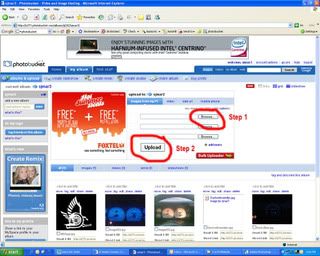
1) Go to photobucket (http://photobucket.com/)
Image


2) Sign up (its free)
Image


3) Click browse (step 1), find the pic, the click Upload (step 2)
Image


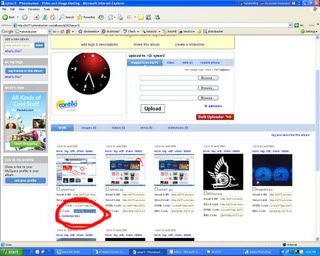
4) Copy "IMG Code" link below the picture
Image


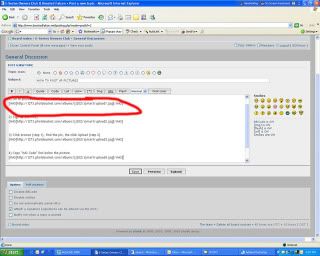
5) Paste the link into your reply
Image


Then you'll have pics in your posts.

Enjoy,
Steve
Last edited by EDFalcon on October 2nd, 2008, 7:13 pm, edited 1 time in total.
Image
User avatar
Malakai
Double Clutching
Posts: 5251
Joined: July 21st, 2007, 1:23 pm
Location: Brisbane
Contact:

Re: HOW TO POST UP PICTURES

Post by Malakai »

Looks pretty straight forward to me. Good idea to put this up.

Thread has been made into a sticky.
FG G6E Turbo MkII - Nizpro Stage 3 - 364 rwkW - 11.63 sec @ 118 mp/h | I like the dark, I love the dark, but I hate nature. Image
User avatar
EDFalcon
Breaking Traction
Posts: 1077
Joined: August 26th, 2007, 6:41 pm
Location: Wheelers Hill

Re: HOW TO POST UP PICTURES

Post by EDFalcon »

Yeah i already answered it twice today so thougth i'd put it up. If i missed anything let me know and i'll put it in.

Steve
Image
User avatar
the_witty_phantom
Idling
Posts: 11
Joined: February 13th, 2008, 6:23 pm

Re: HOW TO POST UP PICTURES

Post by the_witty_phantom »

thanks man ;)
sick got my personalised plates. . . . EFP51....... The beast awakens in a relative time.....
User avatar
ef4tls
Idling
Posts: 49
Joined: February 27th, 2008, 11:56 am

Re: HOW TO POST UP PICTURES

Post by ef4tls »

is there a quicker way???
User avatar
[Sterling]
Double Clutching
Posts: 5701
Joined: November 27th, 2007, 8:25 pm
Location: Im In Miami Trick!! a.k.a Chirnside park

Re: HOW TO POST UP PICTURES

Post by [Sterling] »

no.
2005 MK2 XR6Turbo-Leather-6speed manual-duel zone~weekender.
2011 Holden Colorado LXR-duel cab-Turbo Deisel~work rig/tow car
Boosted B-Series FTW E-Series GTFO.
User avatar
EDFalcon
Breaking Traction
Posts: 1077
Joined: August 26th, 2007, 6:41 pm
Location: Wheelers Hill

Re: HOW TO POST UP PICTURES

Post by EDFalcon »

ef4tls wrote:is there a quicker way???
You can skip steps 1 and 2 once you've signed up so i guess that makes it quicker.. It take about 5 minutes max to do it mate.
Image
makvaiielles_xr6
Idling
Posts: 131
Joined: February 4th, 2008, 4:51 pm
Location: west suburbs of melb

Re: HOW TO POST UP PICTURES

Post by makvaiielles_xr6 »

okay but how do i put it (photo) into the avtar? its saying url specified invalid..... im not :ugeek:
LIL TOY- Escort p/van
MID TOY- 96 EF XR6
BIG TOY- 66 Galaxie
User avatar
rhys
Full Boost
Posts: 2040
Joined: April 4th, 2008, 7:34 pm
Location: Upper Gully, Vic

Re: HOW TO POST UP PICTURES

Post by rhys »

you need to put in your avatar to the actual boostedfalcon website. if you goto your user control panel you upload it ther, but it has to be a rediculously small image size, but it seems normal quality anyway. if you cant get it small enough send it this way and ill reduce it for you then send it back.
1990 Toyota 4Runner SR5 - 5 spd manual - 33" mud tyres - BBQ gas - Slower than your nannas corolla - Goes anywhere you point it

AU Falcon - Sold
Tickford 4L - Pod - XR6 Turbo snorkel - Custom Stainless Intake - SS Inductions T/B - Ph4480's - 3" 200CPSI Hi flow cat - Custom Exhaust - T5 - Exedy HD clutch - SVI LPG - Premium sound - T3 TE50 kit - Bollé Tint - Full XR8 interior
User avatar
burnt turtle
Full Boost
Posts: 2211
Joined: January 17th, 2008, 10:05 am
Location: outside your window

Re: HOW TO POST UP PICTURES

Post by burnt turtle »

there are other sites such as imageshack
may be quicker
Image
User avatar
EDFalcon
Breaking Traction
Posts: 1077
Joined: August 26th, 2007, 6:41 pm
Location: Wheelers Hill

Re: HOW TO POST UP PICTURES

Post by EDFalcon »

The only problem with imageshack is you dont have control over your own photo's once they've been uploaded.. (thats from memory from what i did a while ago though)
Image
User avatar
EDFalcon
Breaking Traction
Posts: 1077
Joined: August 26th, 2007, 6:41 pm
Location: Wheelers Hill

Re: HOW TO POST UP PICTURES

Post by EDFalcon »

To put in an avatar
------------------------------------------------------------------------------------------------------------------------
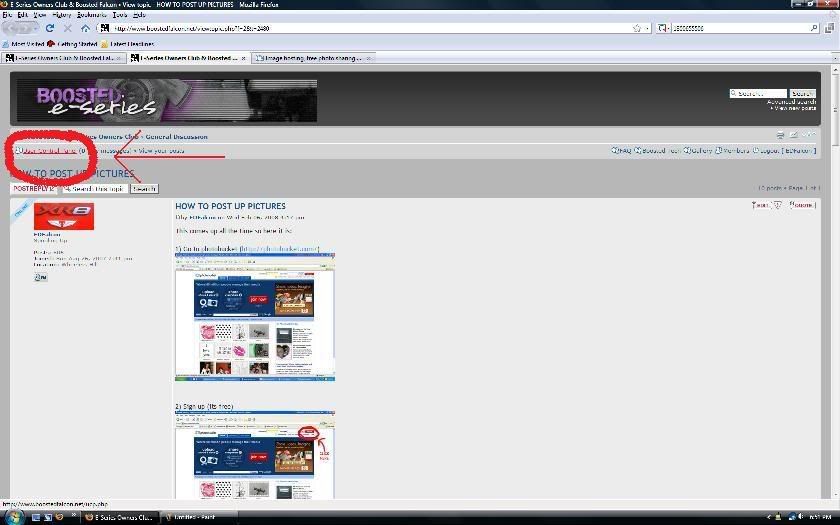
1) Go to User Control Panel
Image

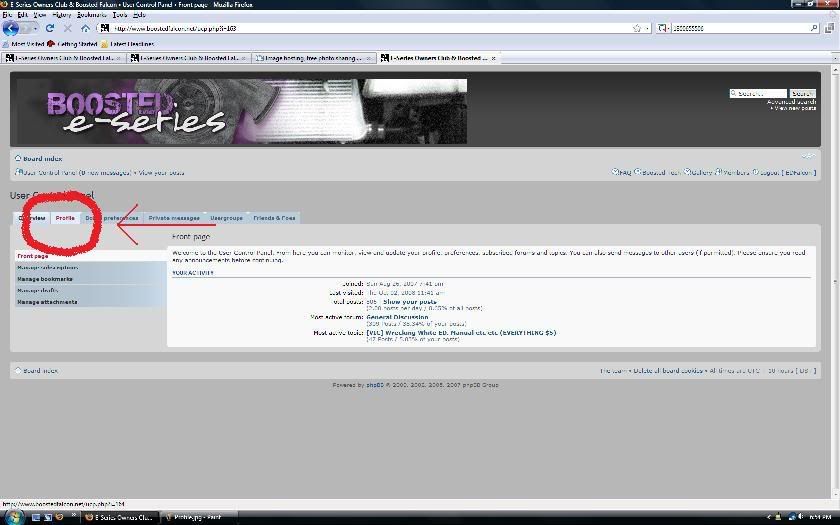
2) Click on the Profile tab
Image

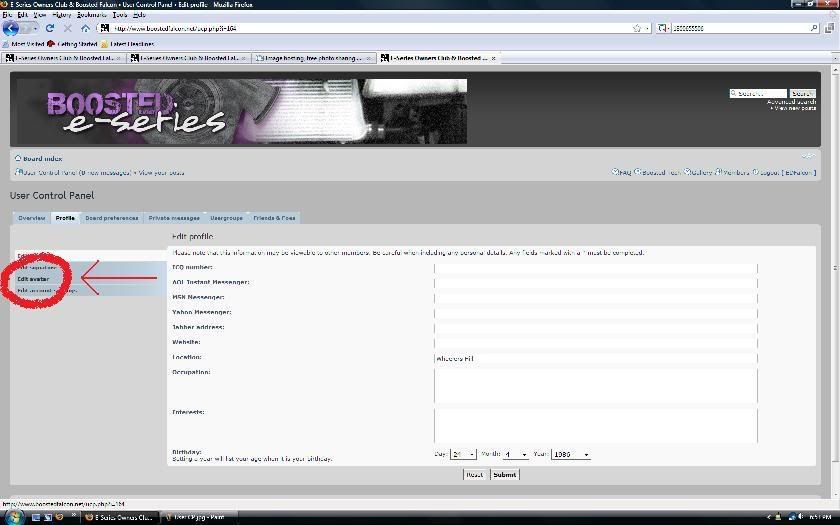
3) Click edit Avatar
Image

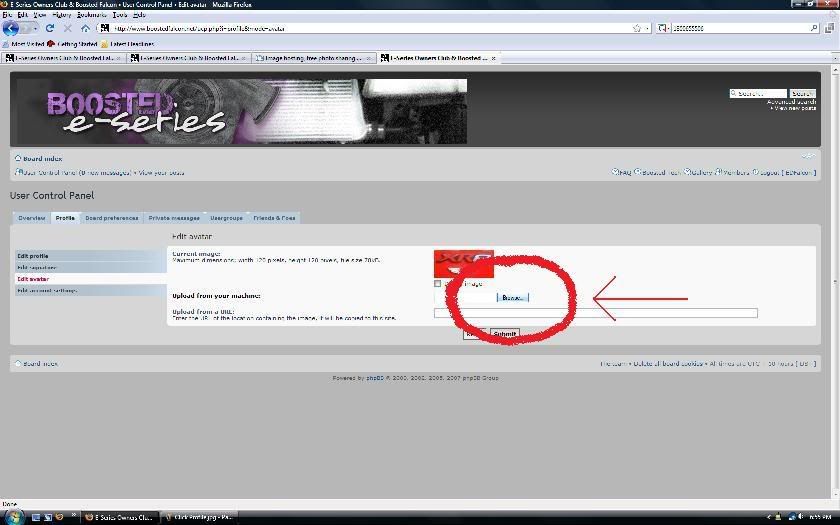
4) Easiest way to upload a pic is to browse your computer for the picture you want as your avatar. Remember it has to be a maximum of the following width 120 pixels, height 120 pixels, file size 78kB. So resize the picture using paint or whatever before you upload it.

Image

Now you're done.

Steve
Image
User avatar
EBeckers
Idling
Posts: 14
Joined: October 26th, 2008, 5:09 pm
Location: SE Subs

Re: HOW TO POST UP PICTURES (and insert an Avatar)

Post by EBeckers »

Hey Great idea :) I'm already a member on photobucket hehe Thanks :D
User avatar
Michael (HYPOEB)
Hitting N2O
Posts: 3125
Joined: November 4th, 2008, 3:09 pm
Location: Morwell Vic

Re: HOW TO POST UP PICTURES (and insert an Avatar)

Post by Michael (HYPOEB) »

ima try now lol
BA XT Wagon: Stock.

EA SVO: Stock.

EBT-747: -

Image
Post Reply